
This Voyager performance deep dive explains how the Warfront greybox improved from 60–70 FPS to more than 95 FPS.
Voyager was running at around 60 to 70 FPS in the Warfront greybox.
That is playable. It is also not where I wanted it to be.
So instead of guessing, I profiled the game properly.
The result was a jump to roughly 95 FPS in the heaviest areas and around 108 FPS in lighter parts of the map. More importantly, I learned where the game was actually spending its time.
Some of the results were expected.
Others nearly sent me in the wrong direction for an entire day.
One important note before getting into the numbers: I tested this on one machine, using an RTX 5080 Laptop, inside the current Warfront greybox. Final art, materials, effects, and twelve live players will all add more cost later.
These are useful development readings, not final performance promises.
First, I Looked at the Map
The greybox contained almost 4,900 separate static-mesh pieces.
Most of them were basic cubes, cylinders, and cones. They had been placed one by one during level design.
That is normal for a fast blockout. It is also expensive when the engine has to draw each piece separately.
At first, the scene produced thousands of draw calls.
I enabled Nanite on the repeated greybox meshes, which allowed Unreal Engine to handle the geometry far more efficiently.
After that change, the packaged build dropped to around 400 draw calls.
That was the first major win.
However, reducing draw calls did not fully explain the frame rate. I still needed to find out which rendering passes were using the most GPU time.
The Obvious Suspect Was Wrong
The map had 131 dynamic lights.
Naturally, I assumed they were the problem.
They were not.
Together, all 131 lights used only about 0.35 milliseconds of GPU time.
Meanwhile, shadows used more than 2 milliseconds, making them one of the most expensive parts of the frame.
The full GPU capture looked like this:
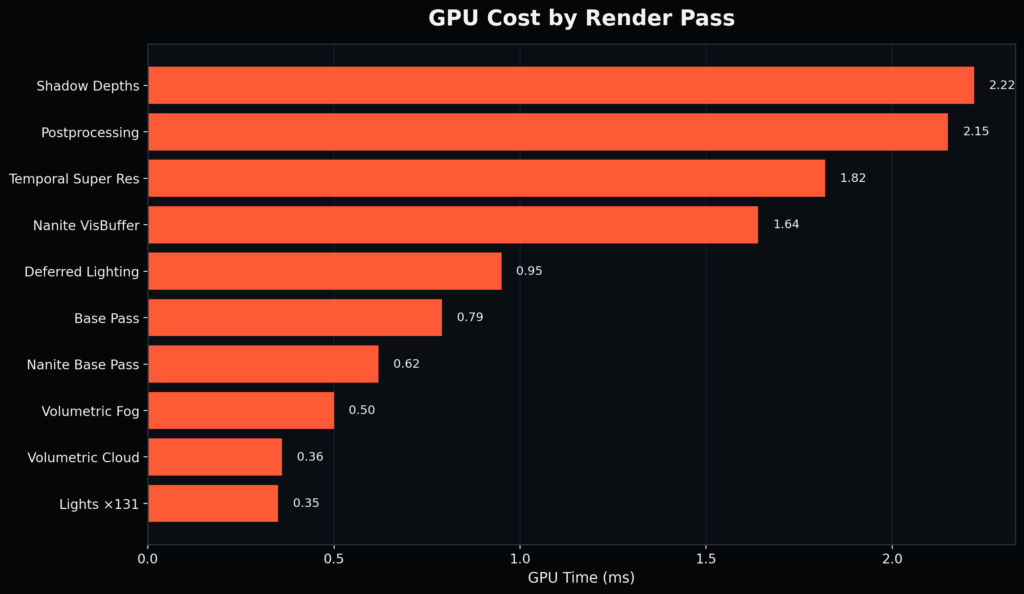
The lesson was simple:
Do not optimize what looks expensive. Optimize what the profiler proves is expensive.
Had I trusted my first guess, I could have spent hours removing lights that were barely affecting performance.
Cutting the Shadow Cost
The main sunlight was casting dynamic shadows out to 200 meters.
That meant Unreal Engine had to redraw a huge amount of geometry into the shadow map every frame.
Most of those distant shadows were not noticeable from the player’s point of view.
So I reduced the dynamic shadow distance from 200 meters to 90 meters.
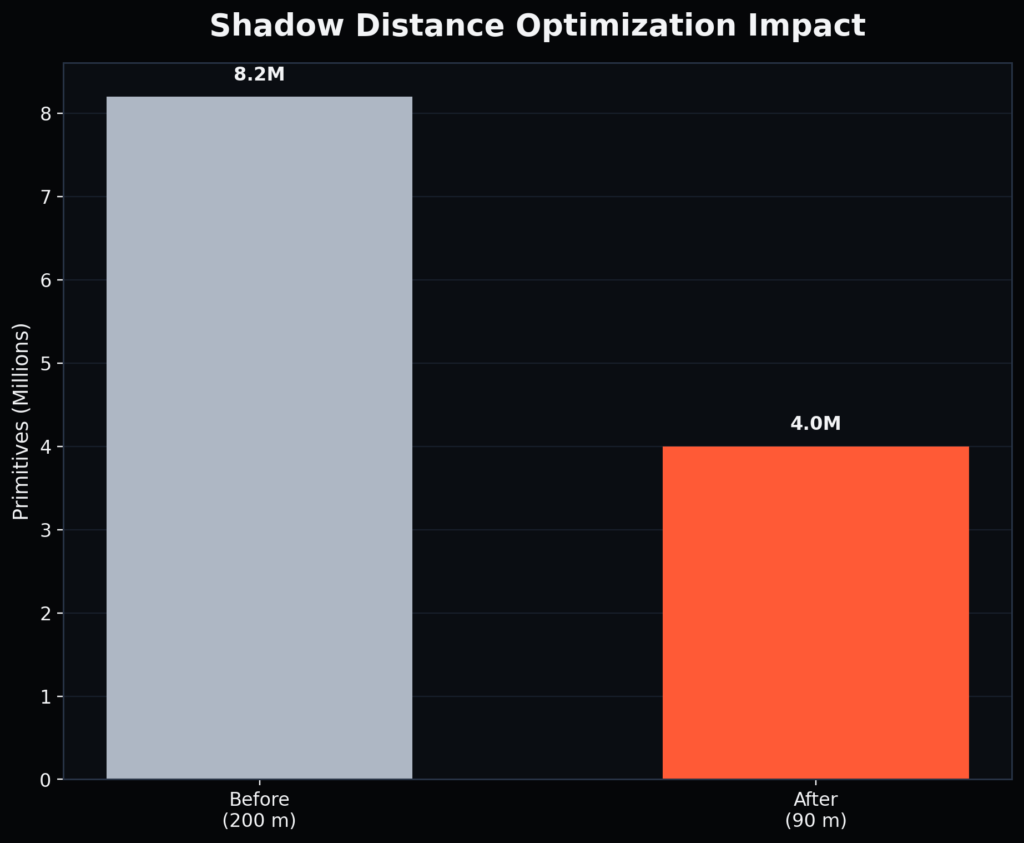
That change cut the amount of shadow geometry from roughly 8.2 million primitives to 4 million.
The shadow pass also dropped from about 30% of the frame to roughly 21%.
I also added distance limits to the smaller lights around the map. Once a player moves far enough away, those lights stop being evaluated.
The visual difference was small.
The performance gain was not.
The Render-Thread Red Herring
This was the most misleading part of the process.
I packaged a Development build and checked Unreal Engine’s stat unit display.
It showed the render thread at about 11.6 milliseconds.
That made it look like the CPU render thread was the bottleneck.
Taken at face value, the next step would have been to reduce CPU-side rendering work.
That would have been the wrong move.
I then packaged the same scene using Unreal Engine’s Test configuration. Test builds are much closer to Shipping performance, while still allowing basic performance stats.
The numbers changed dramatically:
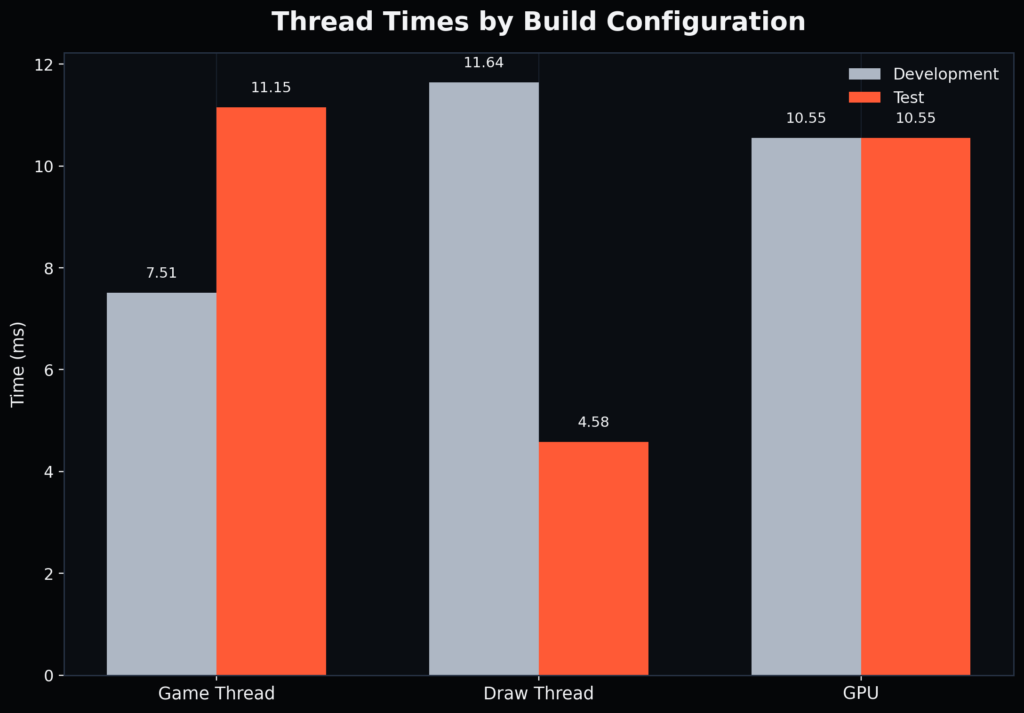
The GPU time stayed exactly the same.
The render-thread time dropped from 11.64 ms to 4.58 ms.
That meant the Development build was adding almost 7 milliseconds of debug overhead to the render thread.
The game was never truly render-thread bound.
It was GPU-bound the whole time.
Without checking a more representative build, I could have spent an entire day optimizing a bottleneck that did not exist.
Lowering the Render Scale
Once I confirmed the GPU was the real bottleneck, I tested resolution scaling.
I lowered the internal render resolution to 66% and used Unreal Engine’s Temporal Super Resolution to upscale the image back to the display resolution.
This improved performance in most areas.
However, it revealed something important.
In the heaviest parts of the map, reducing the number of rendered pixels by 22% only improved GPU time by about 2%.
That meant those areas were not mainly limited by resolution.
They were limited by geometry and shadows.
Resolution scaling helped the average frame rate, but it did not solve the worst-case scenes.
The Final Shadow Change
The last major change was lowering the shadow-map resolution from 2048 to 1024.
This directly targeted the pass that had remained expensive throughout the entire profiling session.
Here is how the worst-case frame rate changed:
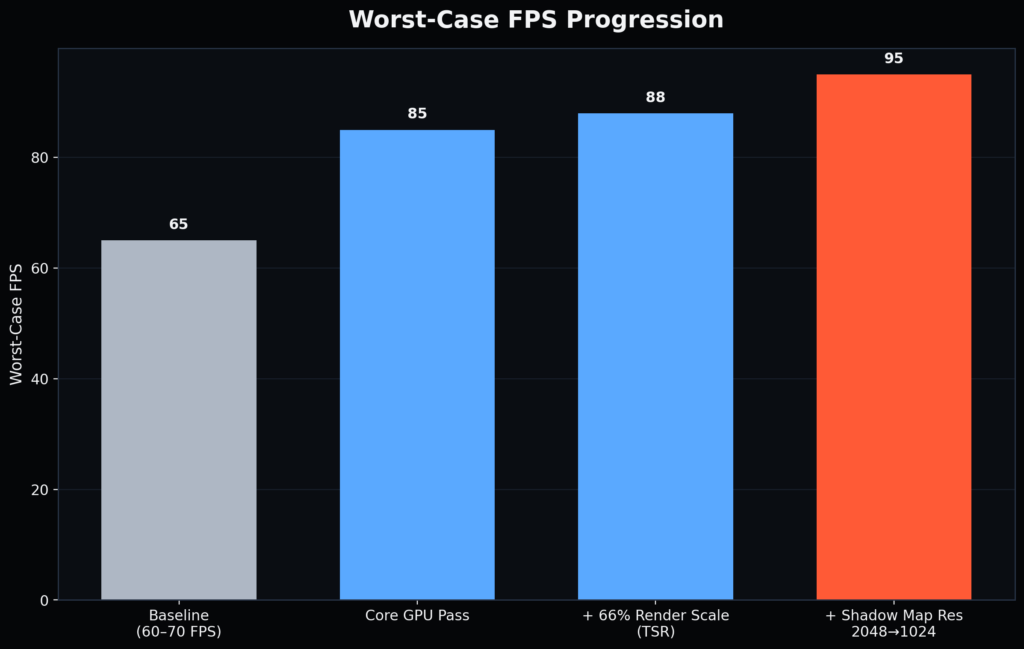
The most demanding parts of the map now sit at around 95 FPS.
Most lighter areas run closer to 108 FPS.
What I Chose Not to Change
The profiler pointed toward another possible improvement: Virtual Shadow Maps.
On modern hardware, Virtual Shadow Maps can work extremely well with Nanite. They can also produce better-looking shadows.
However, Voyager currently has a deliberate low-spec rendering profile.
Virtual Shadow Maps, Lumen, and ray tracing remain disabled because I do not want the game to quietly require RTX-class hardware.
Turning those systems on might have improved performance on my machine while hurting the hardware target for the game.
That would not be a real optimization.
It would be changing the requirement.
I also left volumetric fog and clouds enabled. Together, they were relatively cheap, and they contribute heavily to the atmosphere of the map.
Performance work is not about disabling everything.
It is about spending the frame budget on the features that matter.
What I Learned
Measure before changing anything
The 131 dynamic lights looked expensive.
They were not.
Shadows were the real problem.
Test in a representative build
The Development build made the render thread look slow.
The Test build proved that the extra time came from debug overhead.
Resolution scaling does not fix every bottleneck
It helped in normal scenes.
It did little in the most geometry-heavy areas.
Protect the hardware target
A setting is not an optimization if it forces players onto more expensive hardware.
Greyboxes still need performance work
A blockout may look simple, but thousands of separate pieces can still create real rendering cost.
The Result
The Warfront greybox moved from around 60–70 FPS to:
- About 95 FPS in the most demanding views
- Around 108 FPS in typical areas
- Roughly 400 draw calls
- A clearly identified GPU bottleneck
- A healthy CPU and render thread in representative builds
No major gameplay systems changed.
No expensive hardware feature was enabled.
Most of the improvement came from understanding what the engine was actually doing.
The next performance pass will happen once the map contains final art, full materials, more effects, and twelve real players.
At that point, every number in this post will change.
Then I will profile it all again.
Check out our recent update Snapshot 01 here.
See you in the sector.